

Summary:
Blogmaker now allows users to set up redirects directly within its dashboard, simplifying the process that previously required using Cloudflare or server access. This feature enables easy implementation of permanent 301 redirects, beneficial for SEO, especially when managing old content. Users with "/subdirectory" blogs should update their Cloudflare Worker code accordingly.
Up to now redirects weren't directly possible in Blogmaker. You had to go through either Cloudflare or within your server, if you had access to the root.
Cloudflare handles redirects well, however it only allows up to 10 rules and you have to log in through their dashboard and figure out the correct setup amidst their complexity.
Now, you can simply set your redirects directly in Blogmaker.
To do so, simply go to "Settings > Redirects" within the dashboard.
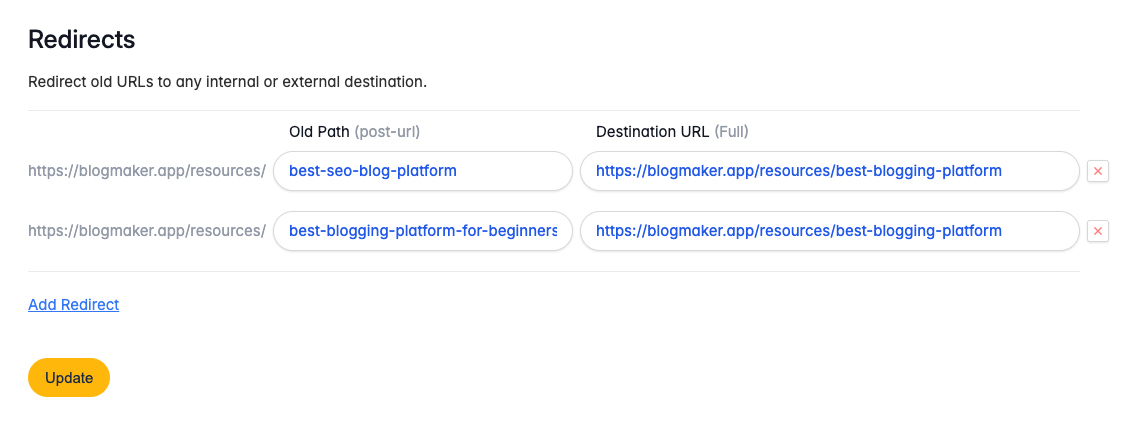
And these redirects resolve to a proper permanent 301, which tells search engines to refer to the new content found on the Destination URL.
Redirects are extremely useful for SEO purposes especially when you're either deleting or merging old content.
A quick note about "/subdirectory" blogs: If you're running your Blogmaker blog on the /subdirectory of your domain, please update your existing Worker code on Cloudflare with the new code found on "Settings > Domain", specifically under this link (you must be logged in to access that path).
The change is a simple update of a few lines of code, but a necessary one that prevents Cloudflare from sending out headers before Blogmaker does so.
And that's all there is to it. Simple and straight to the point redirects, right from the Blogmaker Dashbaord.
Publish your SEO–driven content!
Visit BlogMaker.app